
编译环境:win11, clion 2026.1
ELRS 官网推荐使用VSCode 安装platformIO 插件来编译elrs固件。
本来是简单的修改下,也没啥问题,最近需要git同步代码。 vscode 的 git插件非常不习惯。
发现clion 也支持platformIO插件, 所以果断换回了idea系列的编译器。
记录下完整的过程。
一、安装clion IDE , 此步骤略........
二、打开clion后,安装platformIO插件。
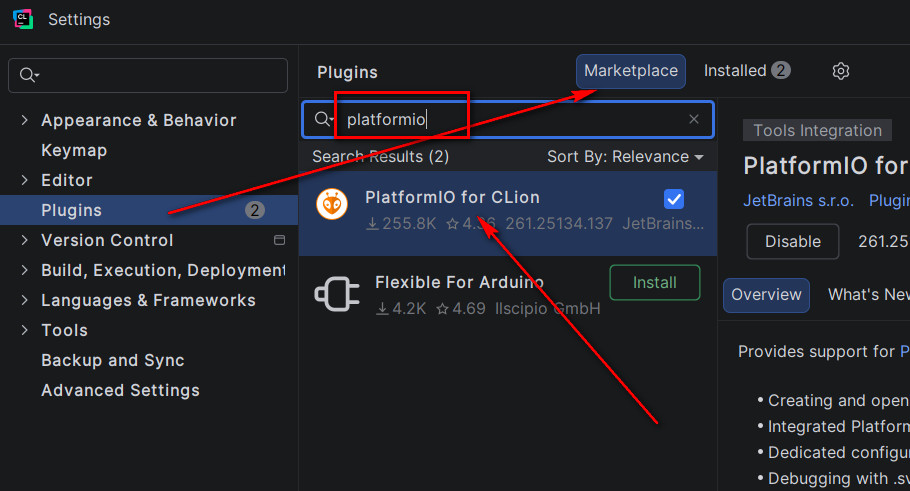
点击File -> Settings -> Plugins ->Marketplace -> 输入【platformio】
选择PlatformIO for CLion 点击右侧的安装。如下图:
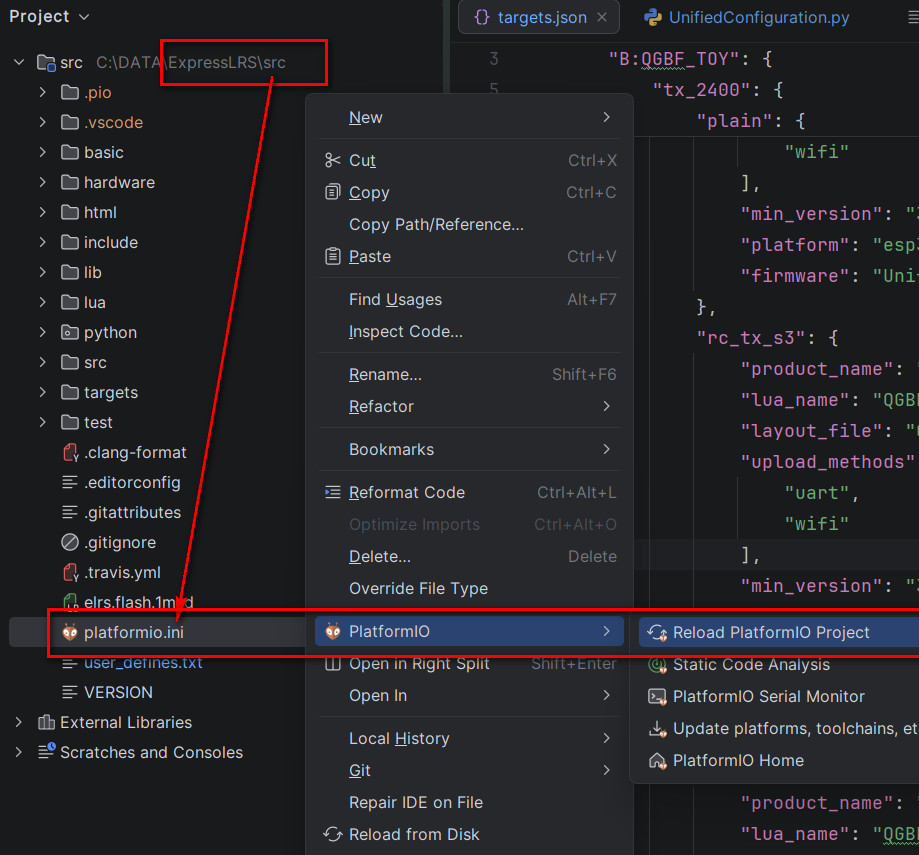
三、安装完pio插件后,打开elrs的src目录(带platformio.ini的目录)不是根目录。
如果没有自动加载pio项目,手动reload一下,如下图:
四、编译elrs源码:
这一步我们需要在命令行里进行编译, 因为编译脚本在编译的最后阶段需要附加引脚配置文件。
如果直接点击Build 或小槌头按键,会报【Not running in an interactive shell, leaving the firmware "bare". 】
错误如下:
...................略......................................

Successfully created esp32s3 image.
appendConfiguration([".pio\build\Unified_ESP32S3_2400_TX_via_UART\firmware.bin"], [".pio\build\Unified_ESP32S3_2400_TX_via_UART\firmware.elf"])
Not running in an interactive shell, leaving the firmware "bare".  <<<<< 运行环境不是交互的shell,单纯的固件‘裸状态’(即没添加引脚定义文件)
正确步骤是打开一个terminal 终端, 在clion 的左下位置。然后输入需要编译的平台, 完整命令如下:
> pio run --environment Unified_ESP32S3_2400_TX_via_UART    <<<<<<<<<<编译命令
.................略.............
Creating esp32s3 image...
Merged 2 ELF sections
Successfully created esp32s3 image.
appendConfiguration([".pio\build\Unified_ESP32S3_2400_TX_via_UART\firmware.bin"], [".pio\build\Unified_ESP32S3_2400_TX_via_UART\firmware.elf"])
0) Leave bare (no configuration)               <<<<<<<<<<<然后就会弹出选择引脚配置定义的交互了。
1) DIY ESP32-S3 DevKit Gemini 2.4Ghz TX
2) Jumper AION Bumblebee 2.4GHz TX
3) Jumper AION T-12 MAX 2.4GHz TX
4) QGBF_TOY_RC_S3 TX 遥控器主板专用
5) RunCam Sirius 2.4GHz TX
default) 0
Choose a configuration to load into the firmware file
4
======= [SUCCESS] Took 90.99 seconds =====

Environment                       Status    Duration
--------------------------------  --------  ------------
Unified_ESP32S3_2400_TX_via_UART  SUCCESS   00:01:30.985
====== 1 succeeded in 00:01:30.985 ========
编译过程遇到的问题及解决方法:
1、在win11上, clion已经配置了全部用UTF8编码,但依旧报
【UnicodeDecodeError: 'gbk' codec can't decode byte 0x99 in position 48: illegal multibyte sequence】, 如下图:
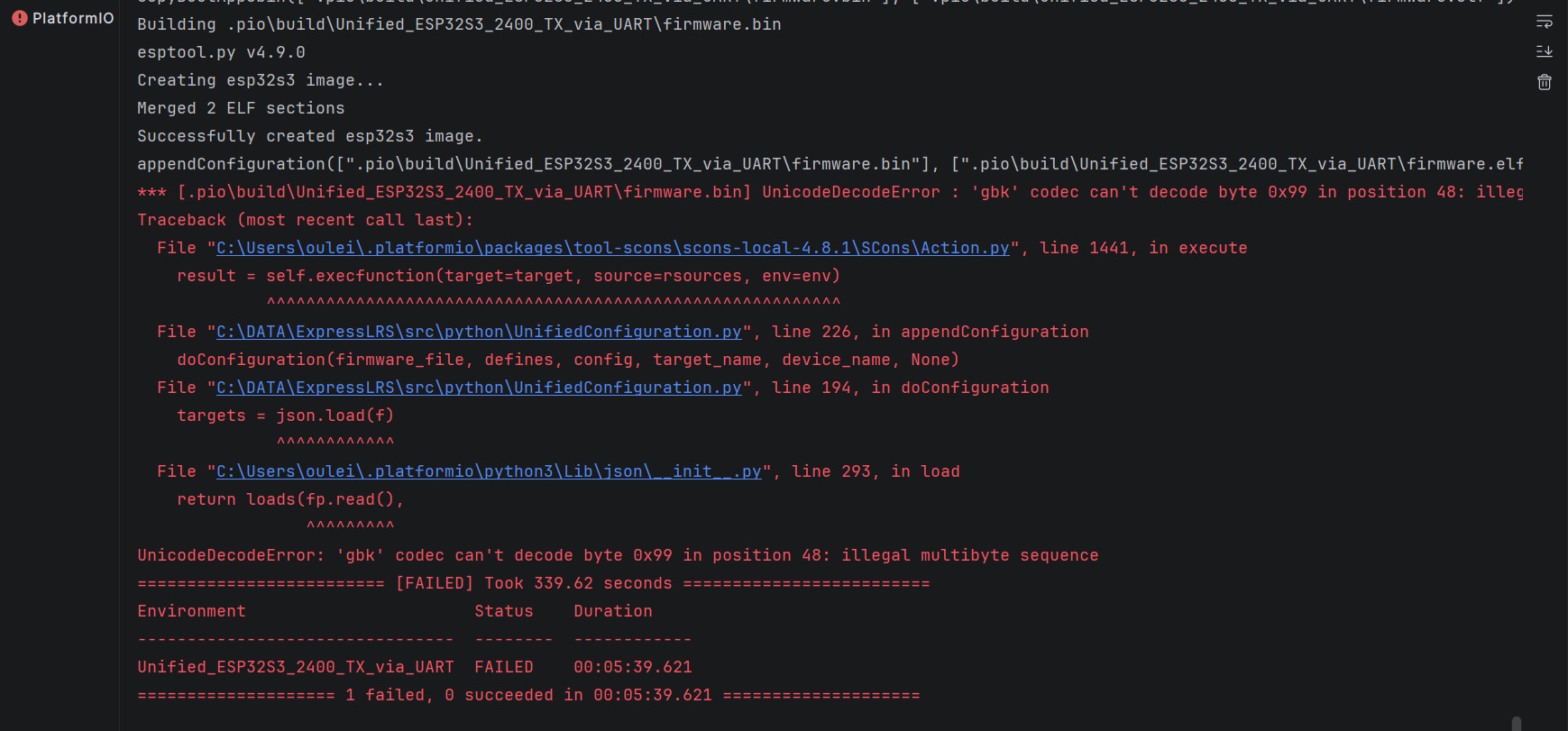
这是因为UnifiedConfiguration.py编译脚本,默认使用windows的GBK编码去加载配置文件【hardware/targets.json】。
所以我们修改UnifiedConfiguration.py脚本文件,指定用UTF-8去加载配置,如下:
UnifiedConfiguration.py  文件的 193 行

    with open('hardware/targets.json') as f:    <<<<<< 将此行打开配置文件,添加指定编码。

改为如下:
    with open('hardware/targets.json', 'r', encoding='utf-8') as f:    <<<<<<指定utf8 来打开。
至此,就可以使用clion顺利的编译ELRS固件了。